
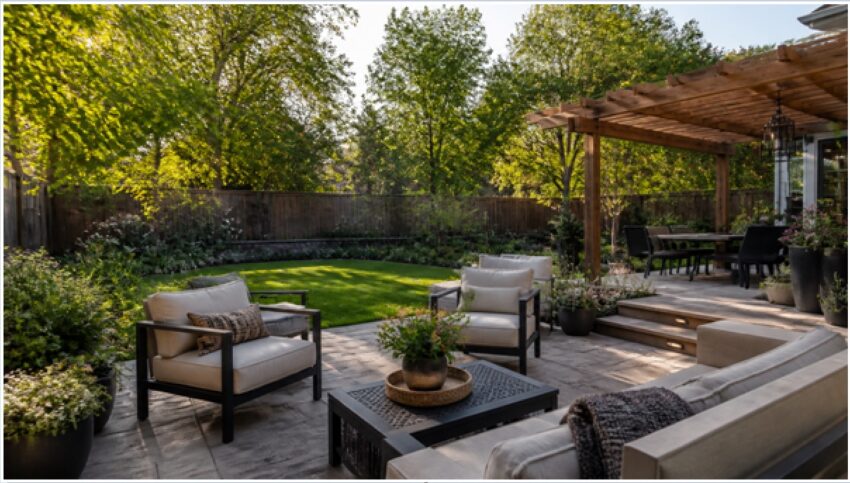
Table of Contents
You can now redesign your entire backyard from one phone photo in about 30 seconds. Snap a picture of your yard, upload it to an AI design tool, pick a style, and get a photorealistic render showing a new patio, planting beds, lawn, and seating in place. It will not pour concrete or move a gas line, but it removes the hardest part of any yard project: picturing the finished result before you spend a dollar.
Most homeowners stall on landscaping because a bare yard is hard to imagine transformed. Hand-drawn plans are abstract, and hiring a designer for a concept sketch runs $300 to $2,500 before any plants go in the ground. That is exactly the gap AI garden design closes. Tools like GenRoom turn a single photo into a photorealistic backyard concept so you can test ideas, compare styles, and walk into a contractor conversation knowing what you actually want.
How does AI garden design work from one photo?
The AI reads the geometry and lighting of your existing yard, then repaints it with new landscaping while keeping the real layout intact. It recognizes where your fence, house wall, lawn edge, and property lines sit, then generates hardscape, planting, and seating that fit those boundaries in a photorealistic render.
The workflow is short:
- Photograph the yard. Stand where you would sit or entertain and shoot in even daylight. A wide angle that captures the full space beats a tight crop.
- Upload and pick a style. GenRoom offers 50+ styles, from modern minimalist and Mediterranean to cottage garden and desert xeriscape.
- Generate. A photorealistic redesign lands in roughly 30 seconds. Upload up to 5 photos to cover different angles of the same yard.
- Refine. Use the AI Editor to change one zone, like swapping a lawn for gravel, and regenerate the rest.
Because it works from your real photo, the render shows your yard reimagined, not a stock catalog garden. That is the difference between inspiration and a plan you can act on.
What parts of the backyard can you plan this way?
You can plan the four elements that define almost every backyard: layout, planting beds, hardscape, and seating. Here is how each one maps to a real design decision.
| Zone | What AI shows you | Decision it helps you make |
| Layout | How lawn, patio, and beds divide the space | Whether to center the lawn or push it to one side |
| Planting beds | Bed shapes, depth, and plant density | Curved borders vs. clean rectangular beds |
| Patio / hardscape | Paver style, size, and placement | Flagstone vs. concrete, and how much square footage |
| Seating | Furniture scale and grouping | Dining set vs. lounge zone, and where it fits |
Seeing all four at once matters. A patio that looks generous on paper can swallow a small yard, and AI renders expose that instantly, so you resize before you buy pavers.
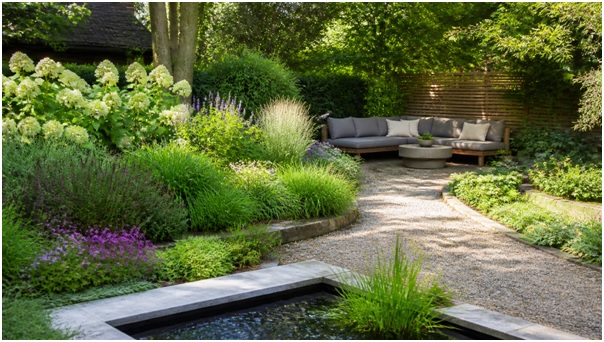
Layered planting beds, a gravel path, and a quiet seating nook, the kind of concept you can test in seconds before committing.
Step by step: designing your backyard in minutes
Follow a five-step loop and you will have three or four viable concepts in under 15 minutes. Speed is the point, because comparing options is what leads to a yard you love.
- Capture the full yard. One clear, well-lit photo from your main vantage point. Overcast light avoids harsh shadows that confuse the render.
- Set the mood with a style. Start broad, such as modern or cottage, before you fine-tune. The style drives plant palette and hardscape material.
- Generate two or three versions. Run the same photo through different styles to compare a low-water desert look against a lush green garden.
- Edit the winner. Use the AI Editor to adjust one zone at a time, then bump to the Pro Model or 4K output for a crisp version to share.
- Export and brief your pro. Hand the render to a landscaper or contractor as a visual brief. It replaces a page of vague adjectives with one clear image.
“A render is worth a hundred Pinterest boards,” is the honest takeaway. It turns scattered inspiration into a single decision your whole household can react to.
What does AI garden design cost, and is it worth it?
AI garden design costs a fraction of a professional concept, with GenRoom plans starting at $6.99 and free starter credits to test first. A traditional landscape designer typically charges $300 to $2,500 for concept drawings alone, so the math favors testing digitally before you commit.
- Start plan: $6.99, for a single project or quick trial run
- Basic plan: $19.99, for homeowners iterating through several styles
- Pro plan: $29.99, for the Pro Model, 4K exports, and heavier use
Worth it depends on your goal. If you want a buildable render to align your family and brief a contractor, the value is obvious. If you need engineered plans for drainage, retaining walls, or grading, you still need a licensed pro. The render is a visualization, not a construction document.
Where AI stops and a landscaper starts
AI garden design plans the look; a landscaper handles the structure, soil, and code. Treat the render as the creative front end and the professional as the build-and-engineering back end.
AI is excellent for style direction, layout options, plant palette ideas, and getting buy-in from everyone in the house. It does not verify what grows in your USDA zone, calculate drainage slope, size a retaining wall, or pull permits. For anything structural or load-bearing, a landscape architect or contractor is non-negotiable. The smart play is to use AI to decide what you want, then hand that clarity to a pro who makes it real and safe.
The Bottom Line
A single backyard photo is now enough to see your finished yard, compare styles, and brief a contractor with confidence, in about 30 seconds per render and starting at $6.99. AI will not lay the pavers or check your drainage, but it erases the guesswork that keeps most yard projects stuck at the idea stage. Photograph your space, generate a few concepts, pick the one that feels like home, and hand the clarity to the pros who build it.
Frequently asked questions
Do I need design skills to use it?
No. If you can take a photo and pick a style from a menu, you can generate a professional-looking backyard concept. There is nothing to draw and no software to learn.
Will the render match plants that survive in my climate?
Not automatically. AI shows a look, not a horticultural guarantee. Cross-check any species against your USDA hardiness zone or ask a local nursery before buying.
Can I redesign just one part of the yard?
Yes. The AI Editor lets you target a single zone, such as replacing a lawn with gravel or adding a patio, while leaving the rest of the render untouched.
How many photos should I upload?
One good wide shot is enough to start. For a full plan, GenRoom accepts up to 5 photos so you can cover multiple angles of the same yard.
Does GenRoom only do backyards?
No. The same tool redesigns interiors and home facades and handles virtual staging, so one account covers indoor and outdoor projects alike.